Strategy Selection and First Allocation
Six-Step Process
Every user's first allocation follows a guided decision tree based on their profile and preferences.
Step 1 – Review your profile
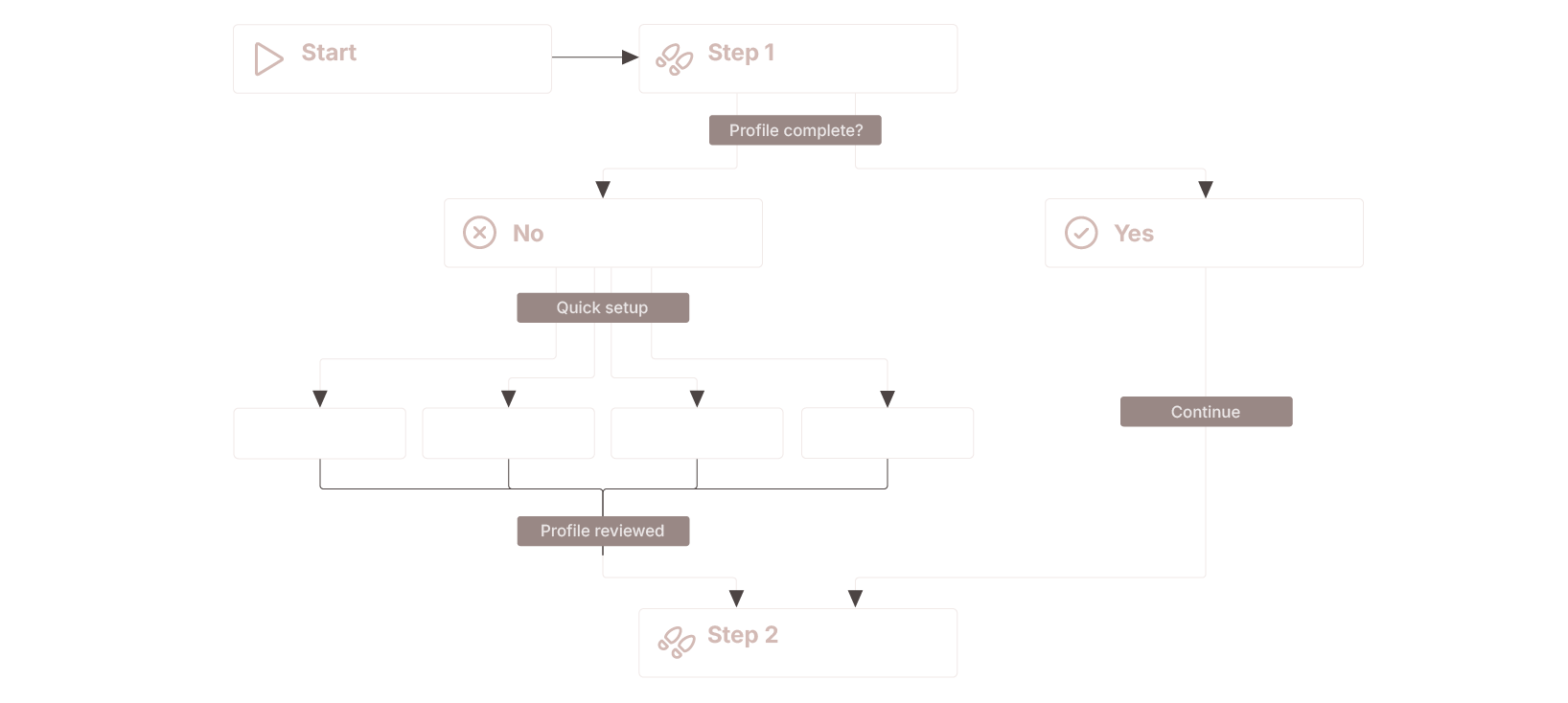
START: You have funds in your wallet
│
├─ Step 1: REVIEW YOUR PROFILE
│  │
│  ├─ Profile complete?
│  │  ├─ YES → Continue to Step 2
│  │  └─ NO → Quick setup (5-10 min)
│  │           ├─ Goals (passive income / growth / preservation)
│  │           ├─ Risk tolerance (conservative / balanced / opportunistic)
│  │           ├─ Time horizon (short / medium / long)
│  │           └─ Preferences (chains, assets, liquidity needs)
│  │
│  └─ Profile reviewed → Proceed
│
├─ Step 2: AI SHOWS MATCHED OPTIONS
Step 2 – AI shows matched options
├─ Step 2: AI SHOWS MATCHED OPTIONS (typically 3)
│  │
│  ├─ Option A: Recommended (best match to your profile)
│  │  ├─ Protocol details (name, type, APY range)
│  │  ├─ Risk score (matched to your tolerance)
│  │  ├─ Cost estimate (gas + fees)
│  │  ├─ Steps required (e.g., "3 steps: approve → swap → stake")
│  │  └─ Reason-codes ("Why this?")
│  │
│  ├─ Option B: Alternative (different trade-off)
│  │  └─ [Same structure as Option A]
│  │
│  └─ Option C: Alternative (different approach)
│     └─ [Same structure as Option A]
│
├─ Step 3: USER DECISION POINT
Step 3 – User decision point
├─ Step 3: USER DECISION POINT
│  │
│  ├─ "I want Option A" → Proceed to Step 4
│  │
│  ├─ "I want to customize allocation"
│  │  ├─ Adjust percentages between options
│  │  ├─ Mix multiple strategies
│  │  └─ Set custom limits → Proceed to Step 4
│  │
│  ├─ "Show me more options"
│  │  ├─ AI shows next 3 alternatives
│  │  └─ Return to Step 2
│  │
│  ├─ "I need to adjust my profile first"
│  │  ├─ Modify goals/risk/preferences
│  │  ├─ AI recalculates recommendations
│  │  └─ Return to Step 2
│  │
│  └─ "I want to research myself"
│     ├─ Exit to protocol list (allow-listed only)
│     └─ Manual selection → Proceed to Step 4
│
├─ Step 4: REVIEW TRANSACTION FLOW
Step 4 – Review transaction flow
├─ Step 4: REVIEW TRANSACTION FLOW
│  │
│  │  OROKAI prepares complete flow:
│  │
│  ├─ Flow Preview:
│  │  ├─ Step 1: [Action] (e.g., "Approve Lido contract")
│  │  │   ├─ What: "Allow Lido to access X amount"
│  │  │   ├─ Cost: Estimated gas
│  │  │   └─ Security: Approval scope (limited vs unlimited)
│  │  │
│  │  ├─ Step 2: [Action] (e.g., "Swap USDC → ETH via Uniswap")
│  │  │   ├─ What: "Exchange assets for staking"
│  │  │   ├─ Cost: Gas + LP fee + slippage estimate
│  │  │   └─ Expected output: Amount you'll receive
│  │  │
│  │  └─ Step 3: [Action] (e.g., "Stake ETH in Lido")
│  │      ├─ What: "Deposit into staking protocol"
│  │      ├─ Cost: Gas estimate
│  │      └─ Expected position: Token amount + APY range
│  │
│  ├─ Total Summary:
│  │  ├─ Total gas cost: [Estimate]
│  │  ├─ Total fees: [DEX + bridge + OROKAI]
│  │  ├─ Total steps: [Number]
│  │  ├─ Estimated time: [Minutes]
│  │  └─ Expected position value: [Amount in your assets]
│  │
│  └─ User sees EVERYTHING before signing ANYTHING
│
├─ Step 5: COST & RISK CONFIRMATION
Step 5 – Cost & Risk confirmation
├─ Step 5: COST & RISK CONFIRMATION
│  │
│  ├─ Review Screen Shows:
│  │  ├─ Risk Warnings:
│  │  │   ├─ Protocol risk level (low/medium/high)
│  │  │   ├─ Liquidity constraints (if any)
│  │  │   ├─ Lock-up periods (if any)
│  │  │   └─ Variable APY disclaimer
│  │  │
│  │  ├─ Cost Breakdown:
│  │  │   ├─ Network gas fees
│  │  │   ├─ DEX/bridge fees (if applicable)
│  │  │   ├─ Protocol fees (if applicable)
│  │  │   ├─ OROKAI UI fee
│  │  │   └─ Total maximum cost (worst case)
│  │  │
│  │  └─ Security Checklist:
│  │      ├─ ✓ Protocol on allow-list (audited)
│  │      ├─ ✓ Contract addresses verified
│  │      ├─ ✓ Network correct (Ethereum/Polygon/etc.)
│  │      ├─ ✓ Approval scope: [Exact amount or limited]
│  │      └─ ✓ Your wallet has sufficient gas
│  │
│  ├─ User Decision:
│  │  ├─ "Looks good, proceed" → Step 6
│  │  ├─ "Adjust settings" (slippage, gas priority) → Recalculate → Step 5
│  │  ├─ "Too expensive, wait for lower gas" → Set alert → Exit
│  │  └─ "Cancel" → Return to Step 2
│  │
│  └─ Confirmation required: [Checkbox] "I understand risks and costs"
│
├─ Step 6: SIGNATURE PHASE (Critical - YOU Control)
Step 6 – Signature phase
├─ Step 6: SIGNATURE PHASE (Critical - YOU Control)
│  │
│  │  OROKAI NEVER SIGNS FOR YOU
│  │
│  ├─ For each step in the flow:
│  │  │
│  │  ├─ Transaction appears in YOUR wallet (MetaMask/WalletConnect/etc.)
│  │  │  ├─ Review transaction details
│  │  │  ├─ Verify: recipient address, amount, network
│  │  │  ├─ Check gas fee (one last time)
│  │  │  └─ Sign or Reject (your choice)
│  │  │
│  │  ├─ If SIGNED:
│  │  │  ├─ Transaction broadcast to blockchain
│  │  │  ├─ OROKAI tracks status (pending → confirmed)
│  │  │  ├─ Progress bar updates
│  │  │  └─ Move to next step when confirmed
│  │  │
│  │  └─ If REJECTED:
│  │     ├─ Flow paused
│  │     ├─ Option to resume later
│  │     └─ Option to cancel entire flow
│  │
│  └─ Multi-step handling:
│     ├─ Step 1 signed → Wait for confirmation → Present Step 2
│     ├─ Step 2 signed → Wait for confirmation → Present Step 3
│     └─ All steps complete → Proceed to Step 7
│
├─ Step 7: CONFIRMATION & POSITION TRACKING
Step 7 – Confirmation & position tracking
├─ Step 7: CONFIRMATION & POSITION TRACKING
│  │
│  ├─ Success Screen:
│  │  ├─ All transactions confirmed
│  │  ├─ Your new position:
│  │  │   ├─ Protocol: [Name]
│  │  │   ├─ Amount staked: [X tokens]
│  │  │   ├─ Current value: [$ equivalent]
│  │  │   ├─ Expected APY range: [Variable]
│  │  │   └─ Next reward accrual: [Timeframe]
│  │  │
│  │  ├─ Actual costs:
│  │  │   ├─ Total gas spent: [Actual vs estimated]
│  │  │   ├─ Fees paid: [Breakdown]
│  │  │   └─ Links to block explorer
│  │  │
│  │  └─ What you can do now:
│  │      ├─ View position in dashboard
│  │      ├─ Set up reward notifications
│  │      ├─ Enable auto-claim (optional)
│  │      └─ Review/revoke approvals
│  │
│  └─ Position now visible in unified dashboard
│
└─ ONGOING: Continuous monitoring begins (see Section 5.4)
   ├─ AI tracks APY changes
   ├─ Monitors for rebalancing opportunities
   ├─ Alerts for claim windows
   └─ Suggests migrations when beneficial
Key Decision Points Where USER Controls Outcome
| Decision Point | User Options | OROKAI Role |
|---|---|---|
| Profile Setup | Goals, risk, horizon, preferences | Suggests defaults, user decides |
| Strategy Selection | Choose recommended or alternatives | Shows options, user chooses |
| Customization | Adjust allocations, mix strategies | Prepares flow, user approves |
| Cost Acceptance | Proceed or wait for better conditions | Shows costs, user decides |
| Each Signature | Sign or reject every transaction | Prepares tx, user signs |
| Approval Scope | Limited vs unlimited permissions | Recommends limited, user chooses |
| Post-Allocation | Monitor, claim, migrate, exit | Suggests actions, user executes |
Core Principle
At every decision point, YOU have final say.
OROKAI informs, prepares, and guides — YOU decide and execute.
No "best execution"
OROKAI does not guarantee best price; we display costs and slippage before signing.