"Zero Wallet Setup" – Investing Without the Need to Create a Wallet
Wallet Abstraction, Not Custody
Abstraction, not custody
We offer a "zero-setup" mode where a wallet is created on the user's side (e.g., smart wallet/MPC linked to their device identity/email), but keys are not stored by OROKAI.
Frictionless onboarding
Users can start with on-ramp through a licensed partner, then – in a few steps – sign their first transactions without manual seed phrase configuration (while retaining the option to export/recover keys on their side).
Full control
Every operation requires conscious authorization; users can transfer assets to another ecosystem-supported wallet at any time.
"Zero-Setup" Does NOT Mean Custodial
This is one of the most important distinctions in OROKAI's design. Many users (and regulators) might assume that "you don't need to create a wallet" means "OROKAI holds your funds." This is absolutely NOT the case.
"Zero-setup" does not mean OROKAI stores keys. It's a utility abstraction over a wallet that remains in the self-custody model.
Comparison
Custodial vs. Non-Custodial Solutions
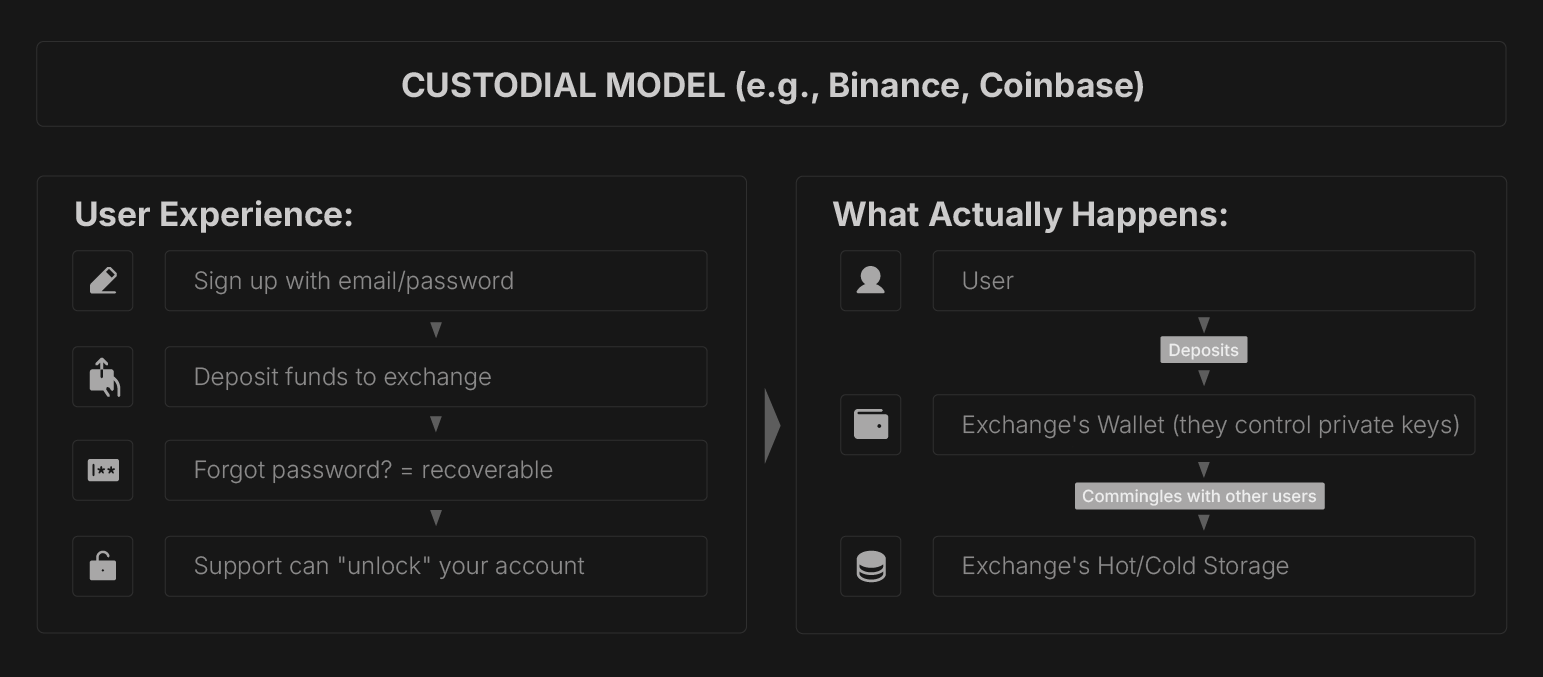
Control: Exchange has your keys
Reversibility: Exchange can freeze/reverse (good & bad)
Regulation: Requires banking/EMI/VASP license
Your risk: If exchange is hacked, you lose funds
Legal status: You are a "creditor" not "owner"
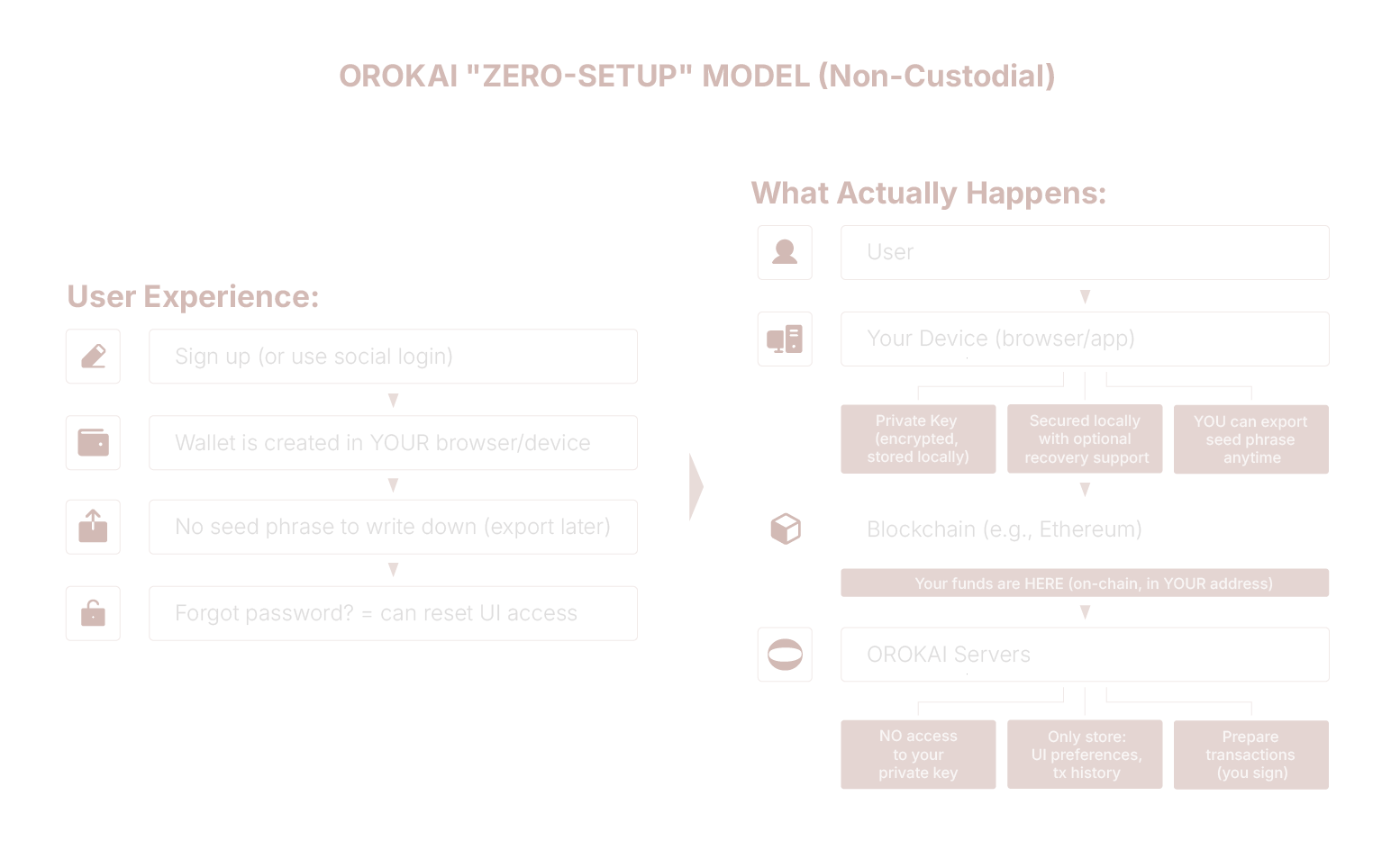
Control: YOU have your keys (on your device)
Reversibility: Blockchain transactions are final
Regulation: Software provider (not financial institution)
Your risk: If OROKAI disappears, your funds are safe
Legal status: You are the "owner" of on-chain assets
How "Zero-Setup" Actually Works (Technical Overview)
Key Questions & Answers
| Question | Answer |
|---|---|
| "Does OROKAI hold my funds?" | NO. Your funds are on-chain in YOUR address. OROKAI cannot access them. |
| "Can OROKAI freeze my account?" | Partially. We can block UI access (e.g., sanctions compliance), but we CANNOT freeze your on-chain funds. You can always access via other wallets. |
| "What if OROKAI gets hacked?" | Your funds are safe. Private keys are on YOUR device, not our servers. Hackers could only access metadata (tx history), not keys. |
| "What if I lose my device?" | Depends on wallet type. Smart Wallet/MPC = recoverable via email/social. Traditional = need seed phrase backup. We recommend enabling recovery BEFORE transacting. |
| "Can I use my OROKAI wallet in MetaMask?" | Yes (if Option C). Export seed phrase → Import to MetaMask. For Smart Wallet/MPC, you'd transfer funds to a new MetaMask address. |
| "What if OROKAI shuts down?" | Your funds remain accessible. Export your wallet before shutdown, or access directly via blockchain explorers + any wallet software. |
| "Is this regulatory compliant?" | In many jurisdictions, non-custodial wallet and DeFi interface software is generally not treated as a custodian or VASP if it does not control user assets. Exact classification depends on local regulation and supervisory practice. |
Comparison with Other "Easy Wallets"
| Wallet Type | Custodial | Seed Phrase | Recovery |
|---|---|---|---|
| Coinbase Exchange | Yes | No (they hold) | Email/SMS |
| MetaMask | No | Yes (12 words) | Only if you saved |
| Argent Wallet | No | No | Social recovery |
| Gnosis Safe | No | Multi-sig | Via co-signers |
| Ledger | No | Yes (24 words) | Only if you saved |
| OROKAI | NO | Optional | Yes (configurable) |
What Happens If You Lose Access
SCENARIO: User loses phone with OROKAI app
Option A/B (Smart Wallet / MPC):
 1. User goes to orokai on NEW device
 2. Click "I lost my device"
 3. Verify identity:
    ├─ Email verification code
    ├─ OR Social login (Google/Apple)
    └─ OR Trusted contact approval (if configured)
 4. Access restored to wallet
 5. Optional: Add new device as additional signer

 Funds: SAFE (still on blockchain)
 Access: RECOVERED
Option C (Traditional Wallet):
IF user backed up seed phrase:
 1. User goes to orok.ai on NEW device
 2. Click "Import existing wallet"
 3. Enter 12-word seed phrase
 4. Access restored

 IF user DID NOT back up seed phrase:
 Funds: PERMANENTLY LOST (same as MetaMask)
 This is why we ENCOURAGE enabling recovery options
OROKAI's Approach:
Default to Option A/B (recoverable) for new users
Show CLEAR warnings about backup responsibility
Offer "Backup now" prompts (but don't force)
Balance UX simplicity with security education
Legal & Regulatory Perspective
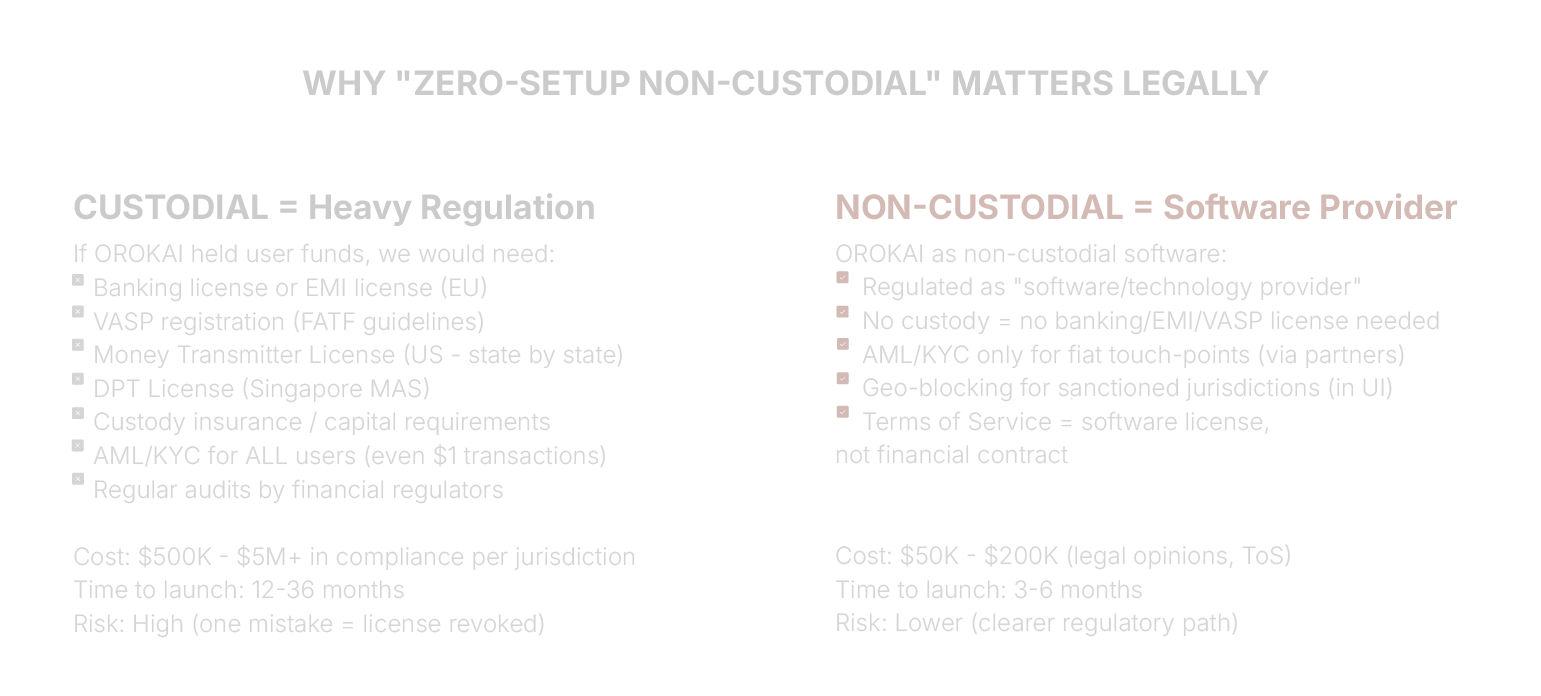
MetaMask (ConsenSys): Non-custodial, NOT regulated as VASP
Uniswap: DEX interface, NOT regulated as exchange
Ledger: Hardware wallet, NOT regulated as custodian
OROKAI follows this path: Software that HELPS users interact with blockchain, but does NOT control their assets.